Vaporesso XROS 5 Pod System Kit: Complete User Instructions & Setup Guide
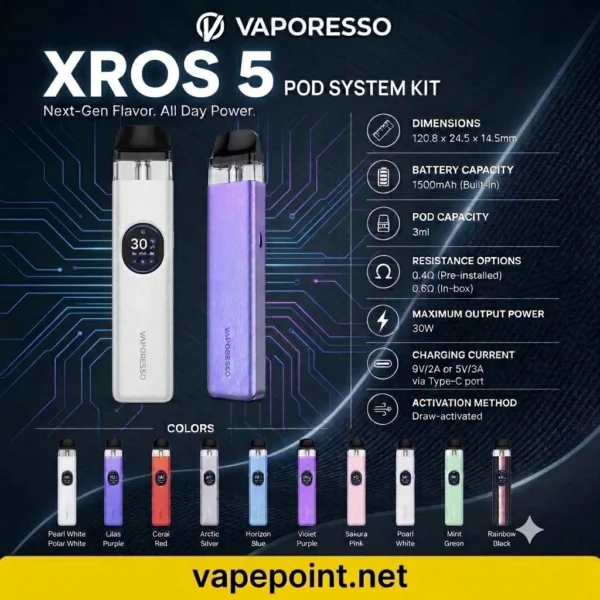
The Vaporesso XROS 5 is a compact, high-performance pod system equipped with a 1500mAh battery, COREX 3.0 heating technology, a 0.88-inch HD screen, and 3A super-fast charging. Whether you are transitioning from disposable vapes or upgrading from an earlier XROS model, following these clear instructions will ensure optimal flavor, consistent vapor production, and maximum coil longevity.
1. Unboxing and Initial Pod Preparation
Before powering on your device for the first time, it is essential to prepare the pod properly to prevent dry hits or premature coil burnout:
Remove the Protective Film: Pull the pre-installed pod straight out of the magnetic battery slot. Peel off the transparent protective sticker from the bottom of the pod; otherwise, the device will not detect the coil or fire.
Top-Fill Procedure: Hold the pod firmly and snap off the black clamshell mouthpiece to the side. Do not pull it straight up. Locate the red-accented silicone filling port on the side (never pour e-liquid into the center metal airflow chimney). Insert your e-liquid bottle nozzle into the red port and fill the pod up to 80–90% capacity.
Prime the Coil: Snap the black mouthpiece back onto the pod until you hear a firm click. Reinsert the pod into the device and let it stand upright for 5 to 10 minutes. This allows the organic cotton inside the COREX 3.0 mesh coil to fully absorb the e-liquid.
2. Single-Button Controls & Screen Navigation
The Vaporesso XROS 5 operates using a single multi-function fire button alongside a 0.88-inch color display:
Power ON / OFF: Press the fire button 5 times rapidly within 2 seconds. The screen will light up with the Vaporesso logo when activated.
Activation Modes: You can vape using auto-draw (simply inhaling through the mouthpiece) or button-activated firing (pressing and holding the button while inhaling).
Adjusting Power & Modes (3 Clicks): Press the button 3 times within 2 seconds to modify output settings:
When using 0.6Ω, 0.8Ω, 1.0Ω, or 1.2Ω pods: Each click cycles between PWR (Power mode for warmer, stronger vapor), NOR (Normal balanced output), and ECO (Battery-saving mode). Stop clicking for 3 seconds to lock in your choice.
When using the 0.4Ω pod: Clicking allows precise wattage adjustments in 0.5W increments up to a maximum of 30W.
Changing Display Themes (2 Clicks): Press the button 2 times within 2 seconds to cycle through 6 built-in screen animations and UI themes.
Accessing the Settings Menu (4 Clicks): Press the button 4 times within 2 seconds to enter the system menu, where you can:
Toggle Button Fire ON/OFF: Disable the physical button while keeping auto-draw active to prevent accidental firing in your pocket.
Reset Puff Counter: Clear your total puff count back to zero.
Lock/Unlock Screen: Press and hold the button for 2 seconds on the lock icon to lock or unlock screen adjustments.
3. Airflow Customization & E-Liquid Pairing
Airflow Control: Use the precision sliding switch on the back of the device. Slide it toward the closed position for a tight Mouth-to-Lung (MTL) draw similar to a traditional cigarette, or open it fully for a looser Restricted Direct-to-Lung (RDL) inhale.
Choosing the Right E-Liquid:
0.8Ω / 1.0Ω / 1.2Ω Pods: Best paired with 50/50 VG/PG Nicotine Salts (20mg–50mg) for smooth throat hits and discreet vapor.
0.6Ω Pod: Versatile for both 50/50 nicotine salts and lower-nicotine freebase e-liquids.
0.4Ω Pod: Designed specifically for 70/30 VG/PG Freebase e-liquids (3mg–6mg) at higher wattage.
4. Charging & Essential UAE Care Tips
Fast Charging: Connect the included USB Type-C cable to the bottom port using a standard 5V/2A or 5V/3A adapter. The 1500mAh battery reaches approximately 80% charge in just 20 minutes. Always remove the pod while charging to prevent heat from thinning the e-liquid.
UAE Heat Protection: Never leave your XROS 5 inside a parked car or under direct sunlight in the UAE. High ambient temperatures thin out e-liquid—leading to leaking or spitback—and can permanently degrade the internal lithium battery.
Routine Maintenance: Wipe the bottom of the pod and the gold-plated contact pins inside the device once a day with a dry tissue to clear natural condensation and maintain a strong electrical connection.
Reviews
There are no reviews yet.
Be the first to review “VAPORESSO XROS 5 POD SYSTEM KIT”Cancel Reply


Reviews
There are no reviews yet.